Dynamic TailwindCSS Colors in Next.js for White Label Applications
When building a white-label application, branding flexibility is key. This includes dynamically changing the logo, favicon, fonts, and — most importantly — colors.
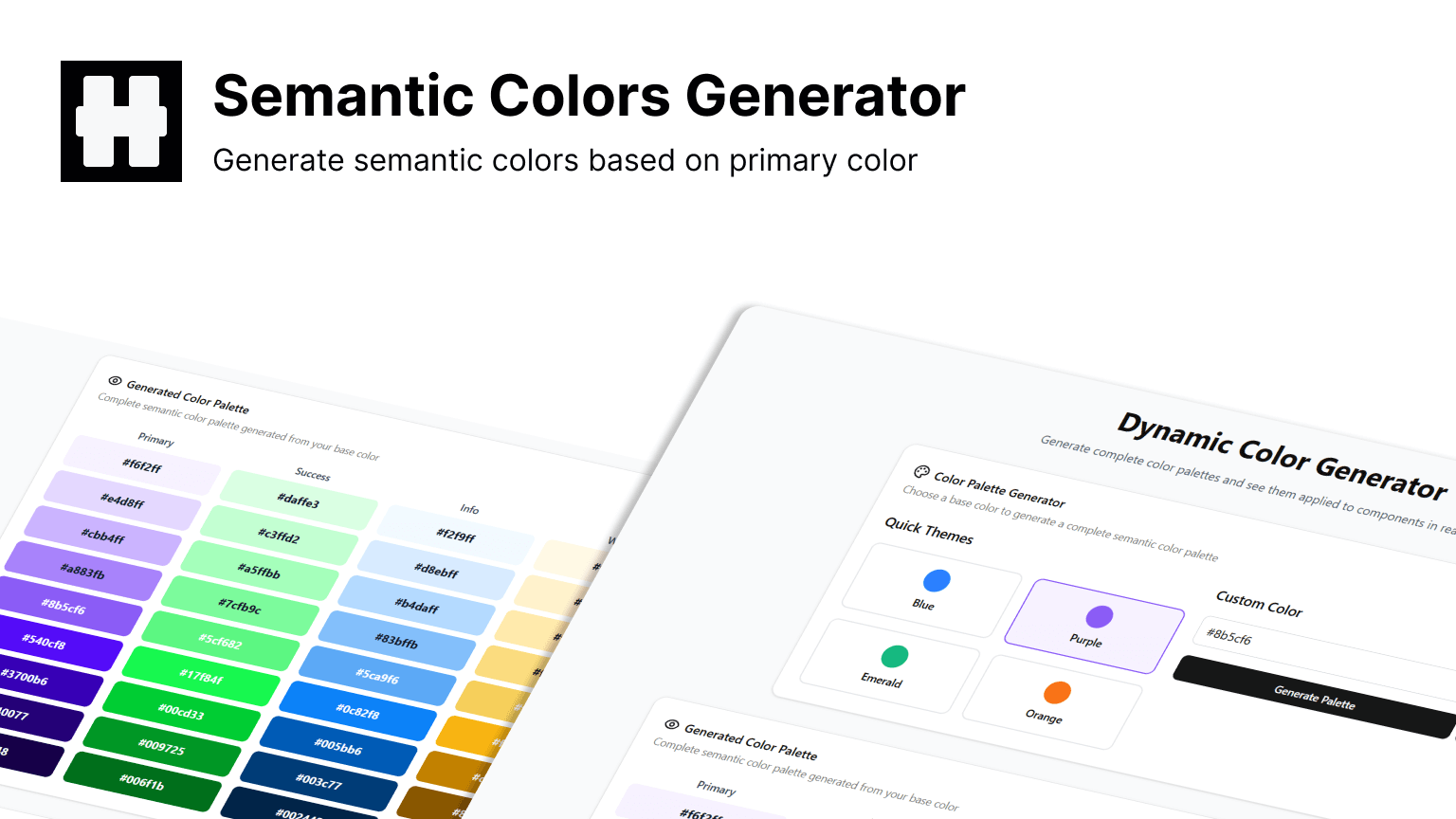
In this post, we’ll focus only on the TailwindCSS + Next.js side of dynamic color theming. My stack also uses MUI, but we’ll save that for another day.
Approach
With TailwindCSS 4.0, the config file is now merged into your global.css, making customization easier using the @theme directive.
We’ll define CSS variables for our colors, map them to Tailwind utilities, and then update them dynamically at runtime.
1. Define Color Variables
We’ll start by defining our color scheme inside :root.
This example uses five main colors: primary, success, info, warning, and danger, each with shades from 100 to 900.
:root {
	--primary-100: #eef5ff;
	--primary-200: #cee1ff;
	--primary-300: #a2c7ff;
	--primary-400: #61a0ff;
	--primary-500: #2b7fff;
	--primary-600: #005be6;
	--primary-700: #0040a2;
	--primary-800: #002a6b;
	--primary-900: #001a42;

	--success-100: #d1ffe1;
	--success-200: #b1fccc;
	--success-300: #8cf3b0;
	--success-400: #59e088;
	--success-500: #2dd267;
	--success-600: #21b153;
	--success-700: #10933e;
	--success-800: #05792e;
	--success-900: #006323;

	/* info, warning, danger... */
}
2. Map Variables to Tailwind Utilities
In TailwindCSS 4.0, you define theme variables inside @theme.
We map each shade to Tailwind’s --color-* format so we can use classes like bg-primary-500 or text-danger-700.
@theme {
	--color-primary-100: var(--primary-100);
	--color-primary-200: var(--primary-200);
	/* ...repeat for all colors... */
}
3. Create a Theme Context
We’ll use React’s Context API to store and update the color palette dynamically.
Types:
// color.ts
export type EvaColor = {
	primary: string[];
	danger: string[];
	info: string[];
	success: string[];
	warning: string[];
};
Context:
// color-context.ts
import { createContext } from "react";
import { EvaColor } from "./color";

export const ColorContext = createContext<{
	currentColor: EvaColor;
	setPrimaryColor: (color: string) => Promise<void>;
	error: string | null;
	clearError: () => void;
	isLoading: boolean;
}>({
	currentColor: { primary: [], danger: [], info: [], success: [], warning: [] },
	setPrimaryColor: async () => {},
	error: null,
	clearError: () => {},
	isLoading: false,
});
4. Implement the Provider
// ThemeProvider.tsx
"use client";

import { useEffect, useState, useCallback, useMemo } from "react";
import { EvaColor } from "./color";
import { ColorContext } from "./color-context";
import { toast } from "sonner";

interface ErrorResponse {
	error: string;
	message: string;
}
const isErrorResponse = (d: unknown): d is ErrorResponse =>
	typeof d === "object" && d !== null && "error" in d && "message" in d;

const ThemeProvider = ({ children }: { children: React.ReactNode }) => {
	const [currentColor, setCurrentColor] = useState<EvaColor>({
		primary: [],
		danger: [],
		info: [],
		success: [],
		warning: [],
	});
	const [error, setError] = useState<string | null>(null);
	const [isLoading, setIsLoading] = useState(false);

	const setPrimaryColor = useCallback(async (color: string) => {
		setIsLoading(true);
		setError(null);
		try {
			const res = await fetch(`/api/get-color?theme=${color}`);
			if (!res.ok) {
				const errorData = await res.json();
				if (isErrorResponse(errorData)) {
					toast.error(errorData.message);
					return;
				}
				throw new Error(`HTTP error! status: ${res.status}`);
			}

			const data = await res.json();
			if (!("primary" in data)) throw new Error("Invalid response format");

			const colorData: EvaColor = data;
			setCurrentColor(colorData);

			Object.entries(colorData).forEach(([type, shades]) =>
				shades.forEach((c, i) =>
					document.documentElement.style.setProperty(
						`--${type}-${(i + 1) * 100}`,
						c,
					),
				),
			);
			localStorage.setItem("color", JSON.stringify(colorData));
		} catch (e) {
			setError(e instanceof Error ? e.message : "Unknown error");
			console.error("Error setting primary color:", e);
		} finally {
			setIsLoading(false);
		}
	}, []);

	const clearError = useCallback(() => setError(null), []);

	useEffect(() => {
		const stored = localStorage.getItem("color");
		if (stored) {
			try {
				const colors: EvaColor = JSON.parse(stored);
				setCurrentColor(colors);
				Object.entries(colors).forEach(([type, shades]) =>
					shades.forEach((c, i) =>
						document.documentElement.style.setProperty(
							`--${type}-${(i + 1) * 100}`,
							c,
						),
					),
				);
			} catch {
				localStorage.removeItem("color");
			}
		}
	}, []);

	const value = useMemo(
		() => ({ currentColor, setPrimaryColor, error, clearError, isLoading }),
		[currentColor, setPrimaryColor, error, clearError, isLoading],
	);

	return (
		<ColorContext.Provider value={value}>{children}</ColorContext.Provider>
	);
};

export default ThemeProvider;
5. Hook for Easy Access
// use-color-context.tsx
"use client";
import { useContext } from "react";
import { ColorContext } from "./color-context";

export const useColorContext = () => {
	const ctx = useContext(ColorContext);
	if (!ctx)
		throw new Error("useColorContext must be used within a ThemeProvider");
	return ctx;
};
6. Wrap Your App
// layout.tsx
import ThemeProvider from "./ThemeProvider";

export default function RootLayout({
	children,
}: {
	children: React.ReactNode;
}) {
	return (
		<html lang="en">
			<body>
				<ThemeProvider>{children}</ThemeProvider>
			</body>
		</html>
	);
}
7. Color Generator API
In my setup, I use a custom color generator API:
const res = await fetch(
	`https://dynamic-color-generate.heterl0.com/api/get-color?theme=${color}`,
);
For production-grade results, you might consider:
- Eva Design System Color Generator (paid)
- Your own algorithm for generating color shades
Conclusion
With this approach, you can dynamically change TailwindCSS colors in your Next.js app at runtime — perfect for white-label solutions.
Check out my tool here: Dynamic Color Generate